
Cue-Lang介绍
Cue,是一种开源语言,用于定义,生成和验证各种数据:配置,API,数据库模式,代码……。它能够将数据的结构、约束、数值作为同一层级成员,从而简化配置文件的生成。
Cue教程
Cue格式说明
- 使用
//进行单行注释 - 对象被称为结构体
- 对象成员称为结构字段
- 对于没有特殊字符的字段名,可以省略引号
- 结构字段后面无需
, - 在列表中的最后一个元素后放置
, - 最外层的
{}可省略
例子:
1 | str: "hello world" |
Cue 结构、约束、数据
1 | // 结构 |
1 | // 约束 |
1 | // 数据 |
Cue的最佳实践:从开放的结构模式开始,限制上下文可能性,最终具体到数据实例。
Cue哲学:为了保证唯一性,Cue的数据不会被覆盖。
Cue核心规则
- 数据可被重复定义,但必须值保持一致
- 结构字段可以被更强限制覆盖
- 结构的字段会被合并,如果是列表,必须严格匹配
- 规则可被递规应用
1 | hello: "world" |
结构
- 结构并不会输出
- 它的值可能是不确认、不完整的
- 字段必须完全
使用#mydef来定义结构,使用...来定义一个开放的结构体
1 | #Album: { |
1 | #Person: { |
约束
约束与数值使用&字符进行连接时,会将值进行校验
1 | // conjunctions on a field |
替换
使用|可以实现支持多种结构。同时它也可以为出错值设置替换值
1 | // disjunction of values (like an enum) |
默认值与可选
使用*来设置默认值, ?设置可选字段
1 | s: { |
开放模式与封闭模式
开放模式意味着结构可以扩展,关闭模式意味着不能扩展。 默认情况下,结构是开放模式,定义是封闭模式。 可以通过定义的最后添加...来申明开放模式定义;另外通过过close强制为结构体设置为关闭模式
1 | // Open definition |
推荐从基础定义开始,复用定义
在编写Cue时,推荐从基础定义开始,这样能够有更好的复用能力。
1 | #Base: { |
定义多行字符串
- 使用
"""来定义多行字符串
1 | str1: #"avoid using \ to "escape""# |
- 使用反引号(`)定义原始字符串
1 | multiline: ` |
- 使用#”…”# 定义原始字符串,可以避免转义
1 | multiline: #" |
- 使用 + 连接多个字符串
1 | multiline: "第一行\n" + |
List
List 可被定义为开放模式,这样便可与其它数据进行合并,
1 | empty: [] |
Struct
结构体是Cue的主要内容,也是最终数据的输出。如上介绍,默认情况下它是开放模式。除了使用Json类型形式进行设置值,还可通过级联:来设置,如a: hello: "world"
1 | // an open struct |
模式匹配约束
模式匹配允许您为与模式匹配的标签指定约束。可以将约束应用于字符串标签,并使用标识符来设置字段。
1 | #schema: { |
表达式
- 引用字段,使用
\(**)显用其它字段
1 | container: { |
- Cue也能够为通过
\(**)来设置key
1 | apps: ["nginx", "express", "postgres"] |
- List遍历
遍历List数据格式如下:[ for key, val in <iterable> [condition] { production } ]
1 | nums: [1,2,3,4,5,6] |
- 条件控制语句
没有else,所有判断都会被执行
1 | app: { |
标准库
Cue的标准库中包含了很多的帮助包(helper packages)。
- Encoding
1 | package stdlib |
- Strings
1 | package stdlib |
- List
1 | package stdlib |
- Constrain
1 | package stdlib |
模块和包
cuelang有module和package系统,可以import依赖
- 模块定义
- 通过在项目根目录创建cue.mod/module.cue文件来定义模块。通过
cue mod init <模块名>来初始化。 - 模块名格式通常为
domain.com/name或github.com/owner/repo
- package组织
- 一个模块可以包含多个package
- 允许在一个目录中包含多个package
- 导入package
- 使用绝对路径导入,不允许相对路径导入
- 导入时可以省略domain,表示导入内置标准包
- 可以在导入时重命名包
- 同一个包内的定义和值可以直接访问,无需导入
例子
1 | package deploy |
使用Cue制作脚本命令工具
Cue 拥有制作脚本命令工具的功能,它有一个工具层,可用来执行脚本、读写文件以及网络访问等。
规范:
- 脚本文件以
_tool.cue结尾 - 执行命令为
cue cmd <name>orcue <name>
例子:
- 脚本文件名为
ex_tool.cue
1 | package foo |
- prompter为命令名
- ask/echo/append/print为唯一标识
- cli.Ask/exec.Run/file.Append为函数,
- &{…}为函数参数
- 创建data.cue
1 | package foo |
- 运行:
cue cmd prompter
1 | $ cue cmd prompter |
- 使用cuelang exec.Run 执行多行代码
1 | package foo |
Tips
- A & B === B & A
- A === A
- 路径短写:{a : {b: {c: 5}}} == a: b: c: 5
- 多种类型:a | b | c
- 默认值:number | *1
- 算术: 4 + 5
- 变量引用:”Hello (person)”
- 列表遍历:[ x for x in y ]
- cue 执行 当前目录下的cue文件及父目录下同一个package的cue文件
- cue ./… 以上目录 + 遍历当前目录的子目录下的cue文件
- _开头的变量不会在输出结果中显示,作为局部变量
- [Name=_] 可用来定义一个模板,其中Name匹配任意字段。例如:
1
2
3application: [Name=_]: {
name: string | *Name
} - _|_ 可判断是否存在。例如:if _variable != _|_ { // … }
1
2
3
4
5
6
7a ?: string
if a == _|_ {
b: "a"
}
// 结果为
// cue export a.cue
// b: "a"1
2
3
4
5
6
7
8a: string
if a == _|_ {
b: "a"
}
// 结果为
// cue eval a.cue
// a: string
// b: "a" - 定义映射:map: [string]: string
- 定义切片:slice: […{name:string,value:string}]
实践
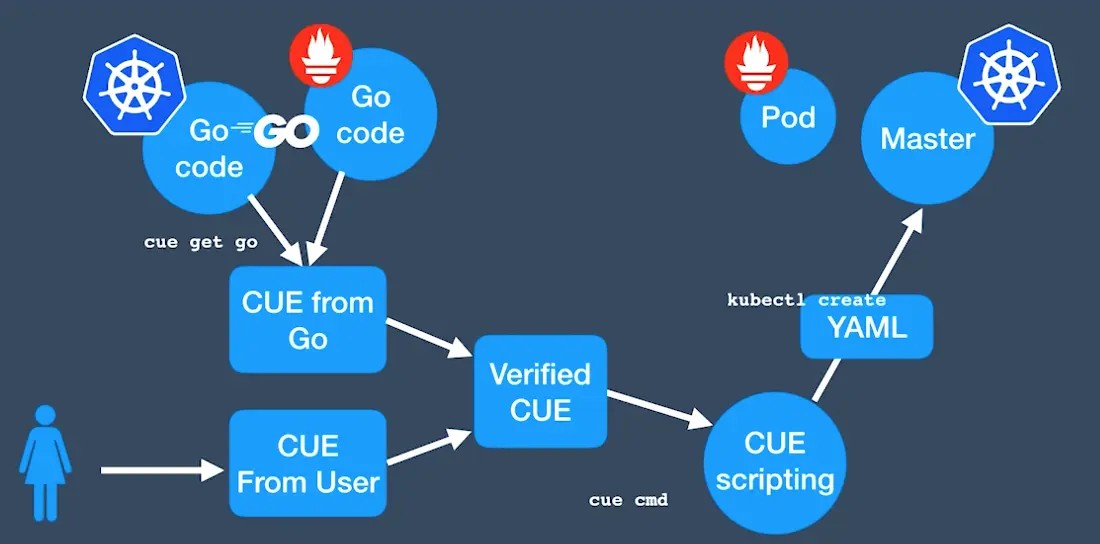
- 使用
cue import将已有的yaml转成Cue语言
1 | $ cue import ./... -p kube -l '"\(strings.ToCamel(kind))" "\(metadata.name)"' -fR |
- 引入k8s资源的模块
1 | $ go mod init main |
- 导入k8s资源模块,并创建资源
1 | package kube |
- cue trim 可用来自动删除冗余字段,以简化配置文件
参考文档
本博客所有文章除特别声明外,均采用 CC BY-NC-SA 4.0 许可协议。转载请注明来源 Michael Blog!
相关推荐

2020-05-20
Scrum敏捷开发
团队成员 一般情况人数在5~9个左右 团队要跨职能(包含开发人员、测试人员、用户介面设计师等) 团队成员构成在Sprint内不允许变化。 用户故事建模为开发任务需求编写用户故事 重要性 用户故事 测试方法 预估时间 30 做为一个会员,可以查看自己的购物清单,以便一起购买 登录,点击购买清单Tab 16h Sprint计划会议(两周一次,4个小时) 设定本Sprint目标及优先级 挑选本Sprint所要开发的需求(Story) 逐一将Story细分成Task 确定每日站会时间和地点 确定演示会议和回顾会议日期计划会议输出: Story Task Hour A 1. 编写自动化验收测试2. 设计用户界面3. 编写用户界面程序代码 4. 编写数据库代码5. 编写单元测试 6. 人工测试 3h5h8h8h8h8h B 1. 编写自动化验收测试2. 设计用户界面3. 编写用户界面程序代码 4. 编写数据库代码5. 编写单元测试 6. 人工测试 3h5h8h8h8h8h 第日立会为早上9:00至9:15 Demo演示时间为:2018-07-1...
2020-05-20
持续交付发布可靠软件的系统方法(基础篇)第四章:测试策略的实现
《持续交付发布可靠软件的系统方法》读书笔记 项目在一开始阶段,测试人员就会与开发人员及客户一起写自动化测试。这些测试应该在开发前就写好。以上这些测试仅仅是系统进行功能测试,容量、安全性及其非功能性试也应尽早建立,为它们写自动化测试套件。确保不符合需求的问题尽早暴露。 业务导向且支持开发过程的测试在开发一个用户故事之前,应写好验收测试,采取完美的自动化形式。系统的验收测试应运行在类生产环境(UAT)验收测试有价值的特性: 它加快了反馈速度 减少了测试人员的工作负荷 让测试人员集中精力做探索性测试和高价值的活动 这些验收测试也是一组回归测试套件 行为驱动开发,可以以这些测试中自动生成需求说明文档 并不是所有的东西都需要自动化。我们倾向于将自动化验收测试限于完全覆盖Happy Path的行为,并仅覆盖其它一些极其重要的部分。每一种测试都应该覆盖应用程序的80%验收测试一般都是端对端测试,但是这样很多时候验收测试的失败并不是因为真正的缺陷,而是因为界面的变更,这将导致增大了验收测试脚本的维护。有两种方法解决这个问题: 在测试与用户界面之间增加一个抽象层,以便减少因用户界面变更而...
2020-05-20
持续交付发布可靠软件的系统方法(部署流水线)第七章:提交阶段
《持续交付发布可靠软件的系统方法》读书笔记 提交阶段的运行应该少于5分钟,一定不要超过10分钏提交阶段的首要目标是创建可部署的产物 提交阶段的原则与实践 提供快速有用的反馈 何时令提交阶段失败 编译错误 测试失败(包括单元覆盖率低于60%) 精心对待提交阶段 提交阶段中有构建用的脚本和运行单元测试、静态分析等脚本。 随着项目的进行,不断改进提交阶段的脚本的质量、设计和性能 确保将脚本做成模块化,将那些经常使用且很少变化的常见任务与需要修改的任务分开 将部署流水线中不同阶段所用的代码分别写在不同脚本中 不要写出与具体环境相关的脚本,即要把具体环境配置与构建脚本分离 让开发人员也拥有所有权如果必要的话,即使是很普通的变更也都应该由开发人员和运维人员来执行 在超大项目团队中指定一个构建负责人 监督和指导对构建的维护 鼓励和加强构建纪律 在团队开始接触持续集成时,构建纪律还没建立起来时,提醒作用 团队成员轮流当,比如每星期轮换一次 提交阶段结果提交阶段的输入是源代码,输出是二进制包和报告(测试结果和代码分析报告) 制品库 制品库仅保存某些版本,而不是全部。如果在部署流水...

2020-05-20
创建自签证书步骤
根证书创建 123$ openssl genrsa -out ca.key 2048$ openssl req -new -x509 -days 36500 -key ca.key -out ca.crt -subj "/C=CN/ST=shanxi/L=taiyuan/O=cn/OU=test/CN=example.com"$ #或者 openssl req -new -x509 -days 36500 -key ca.key -out ca.crt 手动输入配置 创建证书并使用根证书签发 123$ openssl genrsa -out app.key 2048$ openssl req -new -key app.key -out app.csr$ openssl x509 -req -in app.csr -CA ca.crt -CAkey ca.key -out app.crt -days 3650 -CAcreateserial 使用 Openssl 工具查看证书信息 123$ openssl x509 -in app.crt -no...
2020-05-20
《持续交付发布可靠软件的系统方法》读书笔记
基础篇第一章:软件交付的问题第二章:配置管理第三章:持续集成第四章:测试策略的实现 部署流水线第五章:部署流水线解析第六章:构建与部署的脚本化第七章:提交阶段第八章:自动化验收测试第九章:非功能需求的测试第十章:应用程序的部署与发布 交付生态圈第十一章:基础设施与环境管理第十二章:数据管理第十三章:组件和依赖管理第十四章:版本控制进阶第十五章:持续交付管理
2020-05-20
gogs创建用户
/opt/gogs/gogs admin create-user –name=root –password=123456 –admin=true --email=abc@123.com –config=/etc/gogs/conf/app.ini 123oc project cicd &&gogspodname=$(oc get pod | grep gogs | grep -v postgresql| awk '{print $1}')oc rsh $gogspodname /opt/gogs/gogs admin create-user --name=root --password=123456 --admin=true --email=abc@123.com --config=/etc/gogs/conf/app.ini